VIDEO: Kibana 3 Dashboard – 3 Use Cases Demonstrated

Kibana dashboards, from the Elasticsearch project, can help you visualise activity and incidents in log files. Here I show 3 different types of use cases for dashboards and how each can be used to answer different questions depending on the person.  Video and details follow.

Video no longer available on YouTube: Kibana 3 Dashboard - 3 Use Cases

Text Search Dashboard

The first example is the simplest UI I could imagine: a query/search box, a histogram, and a table.  In this instance any user, at any level of curiosity, can find textual data in the logs using a keyword match.

Kibana 3 Dashboard: Text Search

Then they can also see the relative number of records that occur at given times within the time window of all the data available.  These are aggregate counts of all records that have some match to the query keyword or algebra.

Likewise, the table reflects the subset of data provided by the records, with the ability to only show fields of interest.

Process Details

A slightly more advanced use is to focus on a particular process (i.e. application) running on a machine that’s being logged.  Here we can then take a particular metric, i.e. CPU usage, and graph it instead of just a simple histogram.

Kibana 3 Dashboard: Process Details

A typical user may be in charge of a particular set of services in a system.  Here they can see how they perform and yet still dig into the details as desired.

I also do some cool “markers” to subtly show when events coincide with other process metrics.

All Events

The data example shown here has process, performance and event logging information.  I combine multiple queries and having them drive different parts of the dashboard – a pie chart, summary table, histogram, sparkline and other charts based on numeric data.

Kibana 3 Dashboard: All Events

These can then all be filtered based on time windows that are interactively selected.  This is really the typical picture of a dashboard – giving more densely packed information about a variety of metrics, ideal for system managers to get a handle on things.

Streaming Pipeline

The data are generated by Windows servers using a custom C# application that pushes data in a Kafka topic in a Hadoop cluster running in EC2. The data stream is then read from the topic using Actian DataFlow platform and pushed into Elasticsearch for Kibana to use at the end of the pipeline.  There are other reasons I have this kind of pipeline – namely that DataFlow can simultaneously also feed other outgoing part of the pipeline – RDBMS, graph, etc.   More on that in a future video/post.

Next Steps

  • My next plans are to show you Kibana version 4 in action, replicating some of what I’ve shown here.
  • If you haven’t seen it already, see this link and my video with some tips and tricks for using Kibana 3.
  • Tell me more about your interests in dashboards and I’ll consider focusing on them too.

Kafka Consumer – Simple Python Script and Tips

[UPDATE: Check out the Kafka Web Console that allows you to manage topics and see traffic going through your topics – all in a browser!]


When you’re pushing data into a Kafka topic, it’s always helpful to monitor the traffic using a simple Kafka consumer script.  Here’s a simple script I’ve been using that subscribes to a given topic and outputs the results.  It depends on the kafka-python module and takes a single argument for the topic name.  Modify the script to point to the right server IP.

from kafka import KafkaClient, SimpleConsumer
from sys import argv
kafka = KafkaClient("10.0.1.100:6667")
consumer = SimpleConsumer(kafka, "my-group", argv[1])
consumer.max_buffer_size=0
consumer.seek(0,2)
for message in consumer:
 print("OFFSET: "+str(message[0])+"\t MSG: "+str(message[1][3]))

Max Buffer Size

There are two lines I wanted to focus on in particular.  The first is the “max_buffer_size” setting:

consumer.max_buffer_size=0

When subscribing to a topic with a high level of messages that have not been received before, the consumer/client can max out and fail.  Setting an infinite buffer size (zero) allows it to take everything that is available.

If you kill and restart the script it will continue where it last left off, at the last offset that was received.  This is pretty cool but in some environments it has some trouble, so I changed the default by adding another line.

Offset Out of Range Error

As I regularly kill the servers running Kafka and the producers feeding it (yes, just for fun), things sometimes go a bit crazy, not entirely sure why but I got the error:

kafka.common.OffsetOutOfRangeError: FetchResponse(topic='my_messages', partition=0, error=1, highwaterMark=-1, messages=)

To fix it I added the “seek” setting:

consumer.seek(0,2)

If you set it to (0,0) it will restart scanning from the first message.  Setting it to (0,2) allows it to start from the most recent offset – so letting you tap back into the stream at the latest moment.

Removing this line forces it back to the context mentioned earlier, where it will pick up from the last message it previously received.  But if/when that gets broke, then you’ll want to have a line like this to save the day.


For more about Kafka on Hadoop – see Hortonworks excellent overview page from which the screenshot above is taken.

Neo4j Cypher Query for Graph Density Analysis

Graph analysis is all about finding relationships. In this post I show how to compute graph density (a ratio of how well connected relationships in a graph are) using a Cypher query with Neo4j. This is a follow up to the earlier post: SPARQL Query for Graph Density Analysis.

Installing Neo4j Graph Database

In this example we launch Neo4j and enter Cypher commands into the web console…

  1. Neo4j is a java application and requires OracleJDK 7 or OpenJDK 7 to be on your system.
  2. Download the Community Edition of Neo4j.  In my case I grabbed the Unix .tar.gz file and unzipped the files.   Install on Windows may vary.
  3. From command line and within the newlycreatedneo4j-community folder, start the database:
    1. bin/neo4j start
  4. Use web console at: http://localhost:7474 – the top line of the page is a window for entering Cypher commands.
  5. Load sample CSV data using a Cypher command – I cover this in a separate post here.  Be sure the path to the file is the same on your system, matching where you saved the CSV files to.

Quick Visualization

Using the built-in Neo4j graph browser, you can easily see all your relationships as nodes and edges.  For a query, return results that include all the objects:

MATCH (p:Person)
RETURN p

Friends graph sample viewed in Neo4j

Compute Graph Density

Graph Density requires total number of nodes and total number of relationships/edges.  We do them both separately, then pull them together at the end.

Compute the number of unique nodes in the graph

MATCH (p:Person)
RETURN count(p)

count(p)
21
Returned 1 row in 49 ms

This tells us that there are 21 people as Subjects in the graph.  (I’m not sure how this differed from the 20 I had in my other post – perhaps part of the header from the CSV came in?)

Therefore, a maximum number of edges between all people would be 21² (we’ll use only 21×20 as a person might not link to themselves in this example).

Compute the number of edges in the graph

Here we only select subjects that are “Person” and only where they have a relationship called “HAS_FRIEND”.

(The “p:”, “r:” and “f:” prefixes act like the “?…” variables references in SPARQL – you set them to whatever you want as a pointer to the data returned from the MATCH statement.)

MATCH (p:Person)-[r:HAS_FRIEND]-(f:Person)
RETURN count(DISTINCT r)

count(DISTINCT r)
57
 When we defined the data from CSV, we set up a relationship that I thought would be just one-way.  But you can see, if you don’t provide the DISTINCT keyword, that you’ll get double the record counts, so I’m assuming it’s treating the relationships as bi-directional.

Total edges is 57.  Do the quick math and see that the ratio is then:

57 / (21 x 20)
= 57 / 420
= 0.136...

Rolling it all together

We can do all this in a single query and get some nice readable results, even though the query looks a bit long.  Note that I snuck in an extra “-1” to account for that stray record I didn’t account for.

MATCH (p:Person)-[r:HAS_FRIEND]-(f:Person) 
RETURN count(DISTINCT p) as nrNodes, 
 count(DISTINCT r) as nrEdges,
 count(DISTINCT r)/((count(DISTINCT p)-1) * (count(DISTINCT p) - 1.0)) AS graphDensity

nrNodes nrEdges graphDensity
21      57      0.1425

Challenge: Why did I get different results than in the SPARQL query example?

In the earlier post I had only 20 nodes, but in this one got 21.  Can you explain why?

Future Post

What’s your favourite graph analytic?  Let me know and I’ll try it out in the future post.

One of things I have planned is to do some further comparisons between graph analytics in SPARQLverse and other product like Neo4j but with large amounts of data instead of these tiny examples.  What different results would you expect?

Code snippet: SPARQL Query Graph Density

Code snippet: SPARQL Query Graph Density

I’m testing out sharing SPARQL code snippets using Github Gist features. I’ll be adding more as I work through more graph-specific examples using SPARQLverse, but here is my first one:

 SELECT (?nrEdges/(?nrNodes *(?nrNodes - 1.0)) AS ?graphDensity)
 FROM <graphName>
 WHERE {
  { SELECT (COUNT (*) AS ?nrEdges) (COUNT (DISTINCT ?person) AS ?nrNodes)
    WHERE { ?person <knows> ?anotherPerson . }
   }
 }

Ideally we’d have a common landing place for building up a library of these kinds of examples.

Graph relations in Neo4j – simple load example

In preparation for a post about doing graph analytics in Neo4j (paralleling SPARQLverse from this earlier post), I had to learn to load text/CSV data into Neo.  This post just shows the steps I took to load nodes and then establish edges/relationships in the database.

My head hurt trying to find a simple example of loading the data I had used in my earlier example but this was because I was new to the Cypher language.  I was getting really hung up on previewing the data in the Neo4j visualiser and finding that all my nodes had only ID numbers was really confusing me.  I had thought it wasn’t loading my name properties or something when it was really just a visualisation setting (more on that another time).  Anyway, enough distractions…

Graph Data File – Simple Graph Relations Example

I took my earlier sample data and dumbed it down to fit the normal paradigm of Neo4j – separate nodes and edges load files.  I appreciated working with triples before as I didn’t have to pre-load all the nodes first, but that’s also a story for another day.

First, the nodes file looked like the following.  Note, I thought I had to add the ID though I didn’t end up using it after all:

id,name
1,Chong
2,Lashaun
3,Roberta
4,Elin
5,Tameka
6,Rosalie
7,Noella
8,Elim
9,Mae
10,Fernando
11,Alan
12,Katrina
13,Kaitlyn
14,Zackary
15,Nana
16,Lamonica
17,Meggan
18,Fermina
19,Genevieve
20,Manual
21,Jolie

The second file was simply a list of “source” and “target” names – the graph relations – where the first person had the second person for a friend.  (We handle them as unidirectional in this example.)

source,target
Chong,Lashaun
Chong,Roberta
Chong,Elin
Chong,Tameka
Chong,Rosalie
Chong,Noella
Lashaun,Roberta
Lashaun,Elin
Lashaun,Tameka
Roberta,Elin
Roberta,Tameka
Roberta,Rosalie
Roberta,Noella
Elim,Tameka
Elim,Rosalie
Elim,Noella
Elim,Mae
Elim,Fernando
Elim,Alan
Tameka,Katrina
Tameka,Kaitlyn
Rosalie,Alan
Noella,Katrina
Mae,Kaitlyn
Mae,Zackary
Mae,Nana
Mae,Lamonica
Fernando,Meggan
Fernando,Fermina
Fernando,Genevieve
Fernando,Manual
Fernando,Jolie
Fernando,Chong
Alan,Lashaun
Alan,Roberta
Alan,Elin
Katrina,Tameka
Katrina,Rosalie
Kaitlyn,Noella
Zackary,Fernando
Zackary,Alan
Nana,Katrina
Nana,Kaitlyn
Nana,Zackary
Lamonica,Zackary
Lamonica,Fernando
Meggan,Zackary
Meggan,Fernando
Meggan,Jolie
Fermina,Fernando
Fermina,Jolie
Fermina,Chong
Genevieve,Lashaun
Genevieve,Roberta
Manual,Elin
Manual,Tameka
Jolie,Rosalie

Graph of first load test of Neo4j
Basic load example of a handful of relationships.

Loading CSV Relationships into Neo4j

To get the data into Neo4j I had to run two commands.  But first I run a sort of “delete all” as I was doing lots of testing:

MATCH (n)
WITH n LIMIT 10000
OPTIONAL MATCH (n)-[r]->()
DELETE n,r;

Then load all the nodes, assigning each one to a Person entity and grabbing only the name property from the CSV:

LOAD CSV WITH HEADERS FROM "file:///Users/tyler/graph/friends_nodes.csv" AS nodes
CREATE (p:Person { name: nodes.name })

And finally, load the edges/relationships to map persons -> to persons via a has_friend relationship:

LOAD CSV WITH HEADERS FROM "file:///Users/tyler/graph/friends_edges.csv" AS edges
MATCH (a:Person { name: edges.source})
MATCH (b:Person { name: edges.target })
CREATE (a)-[:HAS_FRIEND]->(b);

The resulting load will say something like:

Created 57 relationships, returned 0 rows in 46 ms

More on exploring and analysing this in a future post.  Tweet it or comment if you are interested in more along this line.  Thanks for reading!

Geospatial Power Tools Reviews [Book]

Thinking of buying my latest book?  We’ve finally got a few reviews on Amazon that might help you decide.  See my other post for more about the book.  Buy the PDF on Locate Press.com.

Reader Reviews

Geospatial Power Tools book cover
From Amazon.com

5.0 out of 5 stars This book makes a great reference manual for using GDAL/OGR suite of command line …,
January 24, 2015 By Leo Hsu
“The GDAL Toolkit is chuckful of ETL commandline tools for working with 100s of spatial (and not so spatial data sources). Sadly the GDAL website only provides the basic API command switches with very few examples to get a user going with. I was really excited when this book was announced and purchased as soon as it came out. This book makes a great reference manual for using GDAL/OGR suite of command line utilities.
Several chapters are devoted to each commandline tool, explaining what its for, the switches it has, and several examples of how to use each one. You’ll learn how to work with both vector/(basic data no vector) data sources and how to convert from one vector format to another. You’ll also learn how to work with raster data and how to transform from one raster data source to another as well as various operations you can perform on these.”


“This is a great book for any GIS pro to get their hands dirty and learn how to use spatial tools to do some amazing things. The benefit of using the tools covered in this book (GDAL/OGR) is that you could learn to integrate these tools into other workflows, such as downloading the latest raster data for your organization on weekly basis and running the necessary tools against it.
The first part of the book is filled with some great examples to get you familiar with using these tools and the rest of the book covers the documentation of these tools in detail. This should be on every GIS pros bookshelf.”


Amazon UK:

5.0 out of 5 stars Absolute Must Have Reference.
14 Feb. 2015 By SamFranklin
“I have been a GDAL/OGR user for about 3 years and have always struggled to find readable, entry-level GDAL documentation that provides simple examples which are well explained. This I feel this is a barrier to greater adoption of GDAL/OGR.
This book 100% fills this gap and is therefore required reading for GDAL novices and veterans alike. The book is split between “Common Tasks & Workflows” and then a comprehensive guide to all utilities. I read it cover to cover and picked a number of ideas and solutions to problems with existing workflows involving GDAL, for that alone, it’s easily worth buying. The first chapter provides links to sample data which is used throughout the book. This allows the reader to replicate every example which is great for learning trickier and lesser known utilities.Cannot recommend highly enough. Great job.”
Thanks for reading, reviewing and for the encouraging comments guys.

Follow me on Twitter and follow Locate Press too for latest sales and deals!  Want to write a book too?  Contact me to discuss.


Graph analytics – the new super power

Graph analytics – is it just hype or is it technology that has come of age?  Mike Hoskins, CTO of Actian sums it up well in this article from InfoWorld:
Mike Hoskins writes about graph analytics and how it is a game changer for finding unknown unknowns
“One area where graph analytics particularly earns its stripes is in data discovery. While most of the discussion around big data has centered on how to answer a particular question or achieve a specific outcome, graph analytics enables us, in many cases, to discover the “unknown unknowns” — to see patterns in the data when we don’t know the right question to ask in the first place.”

Read Mike’s full article at:
InfoWorld

In the remainder of this post I outline a few more of my thoughts on this topic and give you pointers to some more resources to help you understand what to do next.

Finding the unknown unknowns?

You are already familiar with the idea of writing SQL queries to extract data from a database.  Perhaps more recently you even remember having to wrap your head around how to consolidate data from a distributed data store?

But that will only answer your questions.

Say again?  Of course you want answers to your questions, but what about discovering new insights via relationships you didn’t even known existed in your data?  Hence, extracting data with a question you did not anticipate.  For example, you may be looking for edge cases or anomalies that can only be seen when analysing multiple “hops” of a relationships in a network (e.g. friends of friends who like the same music).

Until you try some graph analytics or think through a related problem, you probably won’t really understand the power in these ideas.  In many ways our SQL experience has taught us to not ask some of the harder questions because they weren’t possible to answer with SQL!  I’m speaking from my own personal experience on this and how challenged I was to break out of my previous paradigm.

When SQL is a hammer…

…every data problem that can fit in a table looks like a nail.  However, when a single table is full of a myriad of complex relationships, that’s when things start to get really tricky.  If that data should end up on your Data Analyst’s desk, just wait for the fireworks. That is, unless the DA has graph-like querying tools available.

Let’s look at an example, the many-to-many relationships table.  The table in SQL would just be two columns with names in them, representing a relationship between two people: i.e. Harry, Sally.  Those from the graph world see them as two special subjects with a relationship, not two pieces of text in a table.

These two subjects may have a bidirectional relationship too.  So when doing RDF querying or graph analytics, you will often be building queries to find both relationships: Harry->Knows->Sally and Sally->Knows->Harry.

You can emulate this in SQL with a self join or a second query but don’t bother unless your dataset is really simple and your questions are very superficial as you’ll only get one degree of relationships for each join – then you’ll be tempted to do 20 joins to emulate what can be much easier in a graph analysis engine.

You need graph analytics in the future

“You don’t know my business!”  Yes, but we know what the common data handling needs are for most organisations.  Without fail, companies, governments and non-profits alike all deal with relationship-laden data:

  •  Customers “know” other customers – who are the key influencers in your buying community?
  • Donors support certain kinds of causes and share about them in social media – what other causes are gaining more traction than yours with similar types of donors?
  • Patients have various diagnosis that relate to other patients with similar issues – how can we predict better outcomes if certain factors of care are modified?

How are you planning to deal with such complexity in a proactive way?  Your competitors (and all the Internet titans) are already using it in some way (likely to sell to you better), so it is not going away any time soon.

If you’re just getting started in understanding graph analytics, may I recommend my earlier blog post which is a mini HOWTO using the SPARQLverse analytic engine (from SPARQLcity).  Install it in a couple minutes, push some simple data in and get your hands dirty with the ultra simple example there.

Also, if you don’t know some of the differences between RDF, graph data, SQL and SPARQL, it’s worth digging into.  I’ll leave you with a great article by Robin Bloor on the subject.  He clears the air very well in this article from Inside Analysis, here is a snippet but you should really read the whole thing as it’s very insightful:

“Where the RDF databases really score is when you want to do set processing (a la SQL) at the same time that you want to do graph processing. Consider a query such as “Who are the biggest influencers on Twitter over the past six months?”

Both the RDF and Graph database would handle such a query and return the same results quickly. But if you ask the very different question, “Which influencers have had the same pattern of influence on Twitter over the last six months?” you are asking both for graph processing and set processing at the same time to get to the answer, and the RDF databases do both well. Not only that, but this is an area of analytics, which was virtually untapped until recently, because there was no software that could easily do it.”

Follow me @1tylermitchell for further discussion or see my links in the sidebar.


SPARQL Query for Graph Density Analysis

SPARQLcity Graph Analytics Engine
SPARQLverse is the graph analytics engine produced by SPARQLcity. Standards compliant and super fast!

I’ve been spending a lot of time this past year running queries against the open source SPARQLverse graph analytic engine.  It’s amazing how simple some queries can look and yet how much work is being done behind the scenes.

My current project requires building up a set of query examples that allow typical kinds of graph/network analytics – starting with the kinds of queries needed for Social Network Analysis (SNA), i.e. find friends of friends, graph density and more.

In this post I go through computing graph density in detail.

First of all I’d love to hear what your favourite SPARQL query patterns are in this space.  Please ping/tweet me if you have some that you find yourself using over and over!

My starting point is with some of the samples SPARQLcity makes available on their tips and tricks page.  Let’s first look at a sample dataset and then apply a couple of these to a query problem.

Installing SPARQLverse Graph Analytic Engine

Installing SPARQLverse on a Linux machine is dead simple (you’ll need 8GB RAM by default):

  1. Download latest (binary) release (open source code is available as well!)
  2. Unzip the file
  3. Launch the startup script:
    1. rel/bin/sbxstart
  4. Use web console at http://localhost:8080
  5. Now if you have an RDF/Turtle format triples file you can load it via command line – provide the name of graph to create, and your input filename:
    1. ploadsbx mygraph graph_friends.ttl
      

Sample Turtle Format Data for SPARQL

Don’t be scared away from RDF/Turtle or triple stores in general due to the new format.  Triples don’t get much simpler than just three URIs or even just three distinct words on a line.

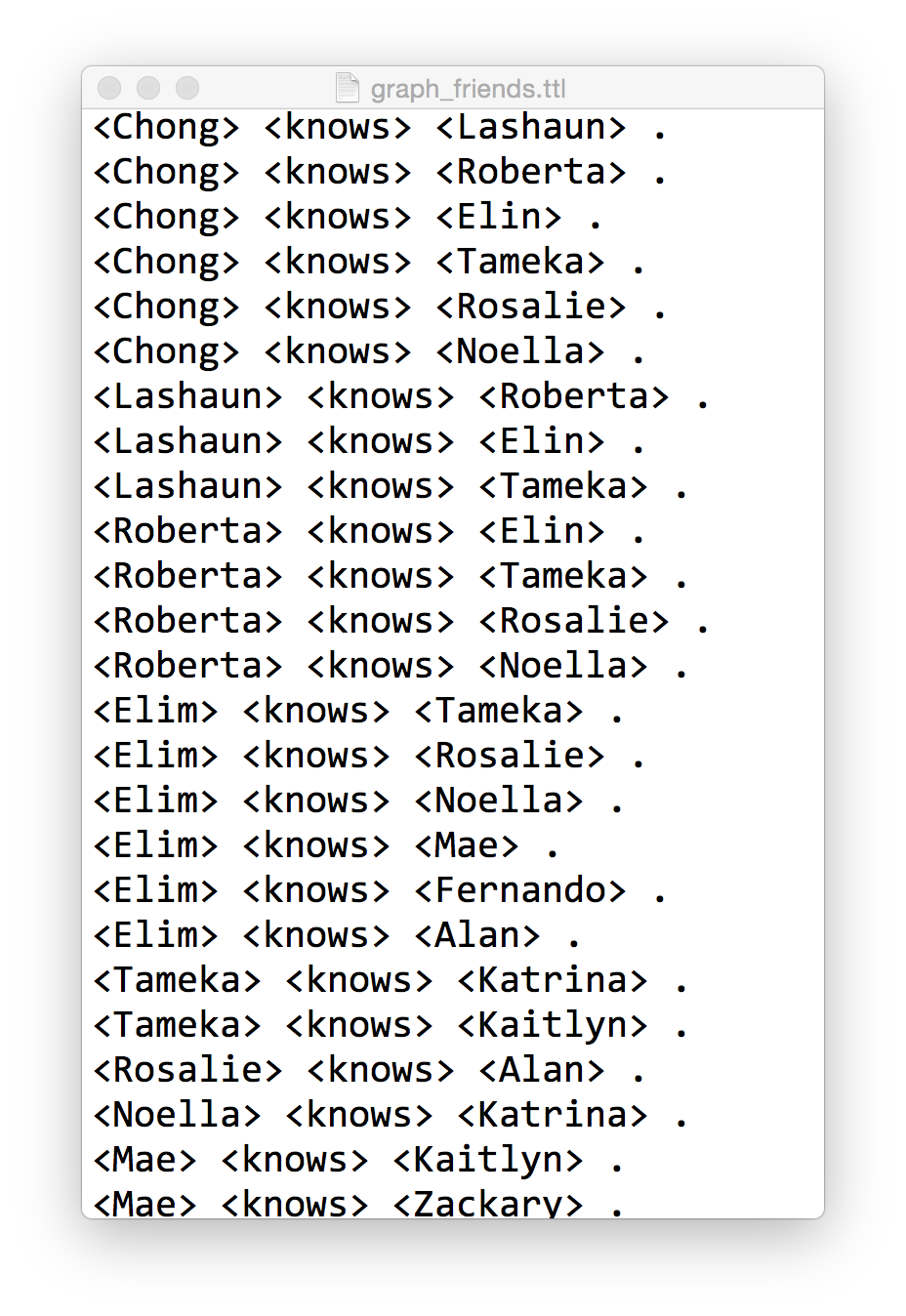
Here is what a sample looks like (graph_friends.ttl) that we can load into SPARQLverse with the above command:

Sample friends graph in Turtle format
Sample friends graph in Turtle format for loading into SPARQLverse graph analytic engine.

It includes 57 specific relationships. The first part of the triple is the Subject, the second is the Predicate/relationship made to the third part, the Object. If you look through the data you’ll see that all the Objects are also defined as Subjects that have other relationships.

Understand the basics here and you’ve got Triples almost mastered.

Note: This is an overly simplistic example, but not totally unrealistic.  We don’t use any URIs but we are allowed to fake them here by simply putting angle brackets around them.  In a linked data environment you’d establish your own namespaces and likely link to external SPARQL endpoints or resources with http:// prefixes.  Now that starts to make your eyes crossed.

Quick Visualisation

As an aside, pull the sample data into Gephi to visualise it and you’ll see the intertwining relationships are not intuitive and would be a challenge to understand using a SQL relational approach.

Friends graph sample viewed in Gephi

What is the Density of the Social Network?

Back to the SPARQL tips page…

What is Graph Density?

Graph density represents how interconnected all entities in the graph are.  They are  a sort of ratio between the total number of connected nodes over maximum number of potential edges.  The value ranges from 0 to 1 – with 0 being a total disconnected graph (not sure if that is technically a graph) with no interconnections between nodes.  And 1 representing a high density graph where all nodes connect to all other nodes.

Here we use a SPARQL query to compute graph density, using the sample dataset above, run from the command line. (Note that I use “?knows” as a predicate when I really want to use “<knows>” but wordpress is not displaying that properly):

$ isbx -c "
 SELECT (?nrEdges/(?nrNodes *(?nrNodes - 1.0)) AS ?graphDensity)
 FROM <graphname>
 WHERE {
  { SELECT (COUNT (*) AS ?nrEdges) (COUNT (DISTINCT ?person) AS ?nrNodes)
    WHERE { ?person ?knows ?anotherPerson . }
   }
 }
"
graphDensity
-------------
0.150000

I changed the example “tips” query to use a different graph name (mygraph) and a different relationship name (knows).  The sub-query in the WHERE clause first counts up the number of edges/relationships and counts the distinct number of nodes as well.  Then the primary query compares that number of edges to nodes.

Let’s break that down into its detail…

Compute the number of unique nodes in the graph

$ isbx -c "SELECT (count (distinct ?person) as ?nrNodes)
> FROM <graphname> WHERE { ?person ?knows ?anotherPerson .}"
nrNodes
--------
20

This tells us that there are 20 people as Subjects in the graph.  Therefore, a maximum number of edges between all people would be 20² (we’ll use only 20×19 as a person might not link to themselves in this example).

Compute the number of edges in the graph

$ isbx -c "SELECT (count (*) as ?nrEdges)
FROM <graphname> WHERE { ?person ?knows ?anotherPerson .}"
nrEdges
--------
57

Total edges is 57.  Do the quick math and see that the ratio is then:

57 / (20 x 19)
= 57 / 380
= 0.149...

Challenge: Inverse Relationships in SPARQL

In some graphs you may not have all the people in the Object position (third part of triple) initialised as Subjects – and their names only show up when someone else defines a relationship to them.

In that case, your density from this query will under-report.  I leave it as an exercise to the reader to figure out how to use SPARQL to do an optional inverse relationship in the sub-query WHERE clause.  Ping me if you want some tips on that.

Future Post

In a future post I’ll walk through some of other graph query examples using SPARQL such as:

  • Who has the most friends who know each other?
  • What is the size of a person’s network?

What else is important to you?  Let me know!


SPARQLverse is part of the Actian Analytics Platform – providing Big Data solutions that are hyper performance with ultimate scalability. Our SQL in Hadoop is the fastest available and runs truly in Hadoop 100%.

Social Graph – Year in Review (Preparation)

Graph developed from Tyler Mitchell's LinkedIn connections.

I pulled this visualization of my LinkedIn social graph together in just a few minutes while working through a tutorial.  What about other social networks?  Give me your input…

I’m picking away at an article reviewing the various ways to access your own, personal, social graph data from the various sources out there.

Wow, what a mixture of results are available through the different APIs that are exposed.  Some good and some bad – some really bad!  I’m especially interested in assessing how many “walled gardens” got taller or shorter walls this year.

Your Social Graph Projects?

I’d like to add your input to my research.  If you have:

  • built an app that leverages social network graph data to identify relationships
  • run social network or graph analytics on such data, or
  • just generally worked with APIs from Twitter, Google+, LinkedIn, Facebook (or others)

… I’d like to hear from you.  What information could you not get access to?  What information was easiest to come by?  Were some barriers insurmountable?

I’ll be completing my article, with both high level and technical “how to” reviews, later this year.

Please comment here or drop me a note.

Data Sharing Saved My Life – or How an Insurer Reduced My Healthcare Claim Costs

It’s not every day that you receive snail mail with life-changing information in it, but when it does come, it can come from the unlikeliest sources.

Healthcare data shown in a list of bio sample test results
My initial test results showing problems with the Liver

A year ago, when doing a simple change of health insurance vendors, I had to give the requisite blood sample.  I knew the drill… nurse comes to the house, takes blood, a month later I get new insurance documents in the mail.

But this time the package included something new: the results of my tests.

The report was a list of 13 metrics and their values, including a brief description about what they meant and what my scores should be.  One in particular was out of the norm.  My ALT score, which helps measure liver malfunction, was about 50% higher than the expected range.

Simple Data Can Be Valuable

Here is the key point: I then followed up with my family doctor, with data in hand.  I did not have to wait to see symptoms of a systemic issue and get him to figure it out. We had a number, right there, in black and white. Something was wrong.

Naturally, I had a follow up test to see if it was just a blip.  However, my second test showed even worse results, twice as high in fact!  This lead to an ultrasound and more follow up tests.

In the end, I had (non-alcoholic) Fatty Liver Disease.  Most commonly seen in alcoholics, it was a surprise as I don’t drink.  It was solely due to my diet and the weight I had put on over several years.

It was a breaking point for my system and the data was a big red flag calling me to change before it was too late.

Wellness FX chart of ALT
A chart showing some of my earlier tests – loaded into WellnessFX.com for visualisation.

Not impressed with my weight nor all my other scores, I made simple but dramatic changes to improve my health.*  Changes were so dramatic that my healthcare provider was very curious about my methods.

By only making changes to my diet I was able to get my numbers to a healthy level in just a few months.  In the process I lost 46 pounds in 8 months and recovered from various other symptoms.  The pending train wreck is over.

Long Term Value in Sharing Healthcare Data

It’s been one year this week, so I’m celebrating and it is thanks to Manulife or whoever does their lab tests, for taking the initiative to send me my lab results.

It doesn’t take long to see the business value in doing so, does it?   I took action on the information and now I’m healthier than I have been in almost 20 years.  I have fewer health issues, will use their systems less, will cost them less money, etc.

Ideally it benefits the group plan I’m in too as a lower cost user of the system.  I hope both insurers and employers take this to heart and follow suit to give the data their people need to make life changing and cost reducing decisions like this.

One final thought.. how many people are taking these tests right now?  Just imagine what you could do with a bit of data analysis of their results.  Taking these types of test results, companies could be making health predictions for their customers and health professionals to review.  That’s why I’m jumping onto “biohacking” sites like WellnessFX.com to track all my scores these days and to get expert advice on next steps or access to additional services.

I’m so happy with any data sharing, but why give me just the raw data when I still have to interpret it?  I took some initiative to act on the results, but what if I had needed more incentive?  If I had been told “Lower your ALT or your premiums will be 5% higher” I would have appreciated that.

What’s your price?  If your doctor or insurer said “do this and save $100” – would you do it?  What if they laid the data out before you and showed you where your quality of life was headed, would it make a difference to you?

I’m glad I had this opportunity to improve my health, but at this point I just say thanks for the data … and pass the salad please!

Tyler


* I transitioned to a Whole Food – Plant Based diet (read Eat to Live and The China Study).  You can read more about the massive amounts of nutrition science coming out every year at NutritionFacts.org or read research papers yourself.

WordPress Appliance - Powered by TurnKey Linux