Would love to hear how you partition your spatial data..
As data volumes grow, so does your need to understand how to partition your data. Until you understand this distributed storage concept, you will be unable to choose the best approach for the job. This post gives an introductory explanation of partitioning and you will see why it is integral to the Hadoop Distributed File System (HDFS) increasingly used in modern big data architectures….
I dug up one of my oldest blog posts from about 7 years ago. In the post, I show how I had connected my Garmin eTrex GPS receiver to an Arduino board and used it to control a camera in a desktop application.
After pumping the data into the Arduino, I parsed the raw GPS data coming from the eTrex and streamed it out to a Python app on the desktop, via a serial port. I was using the output to position a virtual camera in the OSSIMPlanet platform by formatting XML in Python and sending it to a listener built into the OSSIMPlanet app. (OSSIMPlanet is a sort of pre-Google Earth, Google Earth on steroids product.)
I haven’t used it for years, but thought some of the methods from this old post may still apply if you have an Arduino + GPS or Arduino -> Python streaming requirement. Enjoy the flashback – I know it’s inspired me to pick up a new Arduino to continue where I left off.
GPS Controls OSSIMPlanet-With OSSIMPlanet’s nifty camera control and listener functionality, as demonstrated in my last post, you’ve got so many neat opportunities. A couple nights ago I got a basic GPS NMEA parser working. Here’s a pic of the ultra-professional connection method I use to hook it to my arduino board 🙂 Oops, just realised that the picture … Continue reading GPS Controls OSSIMPlanet
Two wires to hook an eTrex data cable up to the Arduino
Recently I started an Internet of Things series on my experiences installing, using and analysing data from a smart electrical meter. This included a BC Hydro smart meter, Eagle monitoring gateway from rainforest automation, and a cloud-based analytics service from Bidgely.
I’ve collated all the posts on the topic for you below. More will be added as I write them. Enjoy!
IoT Day 1: Home Energy Monitoring(3/27/2015)- In my next series of blog posts we explore an Internet of Things topic – Home energy monitoring – from a first person perspective. Join me as I install, use and hack a monitor (and related cloud services) in my new home. This is part 1 of a series of posts about the Internet of … Continue reading IoT Day 1: Home Energy Monitoring
IoT Day 2: Cloud Services for Energy Monitoring(3/28/2015)-Energy monitoring isn’t only about knowing what’s happening right now, but also understanding what happened historically. Often that includes knowing not just what was happening but also when and why. Enter cloud services for energy monitoring. They range from simple charts and graphs to predicting your usage over time – essentially storing, analysing and enriching your … Continue reading IoT Day 2: Cloud Services for Energy Monitoring
After a week of collecting smart meter readings, I’m now ready to show results in a cloud-based energy monitor system – Bidgely – complete with graphs showing readings, cost and machine learning results breaking down my usage by appliance.
This is part 4 of a series of posts about the Internet of Things applied to Home Energy Monitoring. I have a Smart Meter from BC Hydro, an Eagle energy monitor and various cloud apps helping me understand it all.
In this post I’ll show you the three parts of Bidgely that I’ve found most helpful:
Usage dashboard
Cost dashboard
Appliance breakdown (best for last!)
Usage Dashboard
Bidgely Energy Monitor – Usage Dashboard
The main part of the dashboard includes the energy usage during a given period of time – in detail and an overall amount. The usage dashboard is chosen by selecting the lightning bolt symbol in the top right. On the top left you change the time period for the dashboard. Changing it to Billing Cycle or Year will summarise the data into larger groups of time – days or months.
In the 24 Hour time period, the chart shows the amount of kilowatts used in 5 minute time periods. You can mouse-over a point and get the detailed information. This view helps you to understand what your energy usage is like and can help you identify any usage you didn’t know about.
For example, the small spikes throughout the middle of the night were confusing at first, but I figured out that it was the refrigerator running every hour or so. This leads me to know that to reduce that usage I could get a more efficient fridge or take other actions such as placing some jugs of water in the fridge to help retain the cold better. We’ll try that another time and see what effect it has.
Cost Dashboard
Bidgely Energy Monitor – Cost Dashboard
Very similar to the usage dashboard, the 24 Hour view shows the cost of the usage summarised by hour, just as the hydro company will do their billing. This screen is turned on by the $ symbol button in the top right. Mouse over the chart shows more details, include any different Tier usage your utility may have in place.
Appliance Breakdown
Now here is where the real secret sauce of Bidgely gets applied. Showing charts of usage and cost isn’t rocket science, but applying machine learning to gaining further insight into your usage/costs is really useful. Let’s look at an example in this screenshot. Notice the bottom left shows a breakdown of usage by appliance. When you select one, it shows it in the chart and gives a summary % in the bar below the chart:
Bidgely Energy Monitor – Appliance Breakdown
This breakdown magically appears when their algorithms and machine learning analysis start to see patterns of usage in your data. Just like I could instinctively see my refrigerator usage, data analysis can detect similar patterns and make certain assumptions. For example, my heating system draws 1.5kW, so when there is a 1.5kW increase in usage, the assumption can be that my heater turned on. That’s a fairly simple example that isn’t going to gain any venture capital funding.
Things get way more interesting when engineers can determine what appliances are running simultaneously. When a second appliance begins running, say my fridge, at another 0.8kW how can it figure this out? This takes a combination of factors – additional guestimates about typical fridge usage, as well as frequency and duration – together these produce a super smart system that can determine these factors.
The only downside I see so far is that this analysis happens after-the-fact. The initial analysis took about 3-4 days, then they emailed me to tell me they had discovered my “always on” usage, heating system, fridge and clothes dryer. I’m super curious if it will also find my water heater and another space heater I have. Time will tell.
Wish List
Real-time Analytics
I’m also curious if it can become faster at identifying these components. Not an easy feat but I’m sure it’s on their TODO list already. [Perhaps they need a higher performance analytic platform like we produce at Actian!] The closer to real-time that any analytics can get, the better for everybody and the wider the lead Bidgely will have on its competitors.
Manual Training
The other aspect to Bidgely I’d like to see is more ability to manually train their model. My premise here is that the user has innate knowledge about what is going on that a system might never really understand – this should be taken advantage of.
I mentioned in an earlier post that their Appliance Analyzer app helped train the model, but I’m not so sure now. I think it was only to give you a rough idea of your usage in a manual way (which is what they said it did). But it really should be used to train my house and could be done two ways.
First, just like their little wizard does – you identify what device you are using, select Start, turn it on and it tells you when it sees the spike – done. Second, show the current usage and allow the user to select from a checklist what is currently running.
Now, using all of that data in real-time on multiple devices that turn on/off over varying durations of time – that’s still the secret sauce this team brings to the table. I look forward to seeing how they move forward as they continue to develop. It is sure interesting so far!
Offline Updates
I prefer to power down my computer equipment in the evenings, though I keep my energy monitor running. When I power it back on it the morning Bidgely won’t update with the data collected earlier. This is not a unique problem to Bidgely of course, other cloud providers have the same issue, but my Eagle does support downloading older data – so hope they could take advantage of this sync/refresh approach in the future.
Working in the big data and analytics space, I’m always interested in parts of the Internet of Things (IoT) that will produce more data, require more backend systems, and help users/customers get on with their day better.
The past week has shown a few interesting announcements relating to Internet of Things topics. Here are just a few that jumped out to me, either because they inspired me or because I was left wondering what it would really mean.
TL;DR? Summary: While IBM is “getting started” (oops, I meant “getting serious”) and Facebook has big plans to “take over”, Amazon comes out with a consumer focused solution.
Their platform looks like it will take care of so much of the backend work that developers can focus on building out the user side of the app instead, which ultimately can connect to new devices.
The logic behind the wording eludes me. Are they getting serious because they weren’t before and are playing catchup? Either way is fine, but it’s still a little confusing. After all, other companies are still figuring out how to sell into this new market, develop products for it and, seemingly most difficult of all, trying to figure out how make announcements that are more engaging than this one.
Either I’m skim reading too fast, have an ultra low attention span, or missed something behind the headlines – because after all that I read, I’m left with this understanding:
“Yeah we can get into this too, just watch us, we’re spending lotsa cash! And doing something with weather related energy disruption. Watch us!”
I think I owe it to them to re-read some of the copy I saw because I may have read it before I had my morning tea.
All supply chain difficulties disappear in the wake of Amazon bulk goods delivery, or does it? I can honestly say I’ve never ordered toilet paper or laundry detergent from Amazon, though this has certainly got my thinking. Oddly enough, refills are a mere 400m down the street from me and that’s only marginally harder than answering the door for the courier. But I digress…
This announcement hits all the right buttons for me (sorry couldn’t resist) even though I’m not an everyday Amazon user, nor even using Prime. They are talking about things that every person understands and deals with – the magic behind the scenes is nicely hidden away, yet we know their entire supply chain infrastructure has been around a long time and this is just optimising the “when” factor – making it possible to not postpone placing an order, but doing on impulse/necessity.
Most of us will just use a mobile app instead but think a bit longer term. With the largest aging population in the history of the multiverse (read: transgenerational design), the younger generations aren’t going to be able to keep up with their needs without some help. Granted, many seniors can already operate their own apps today, but for everyone else, a button on the washing machine or soap dispenser could really fill in the gaps. Couple that with some moderation-style smart apps for caretakers (oops, granny ordered detergent three times by mistake) and I think you’ve got some really interesting future elder care provisioning.
Target: consumers and manufacturers who are ready to sell. Today!
Who wins for best announcement this week in your books? Tweet me!
I like this concept: “Just press and never run out”. It’s the Amazon Dash Button: http://amazon.com/… – intended to be stuck onto appliances, basically retrofitting ones that don’t have them built in (in the future). Pressing a button orders refills of products, just like Amazon one click ordering online.
The Eagle energy monitor from Rainforest Automation is a very handy device. It reads the wireless signal from my electricity meter and makes it available through a web interface – both a graphical environment and a RESTful API. In this post we look at the standard graphical screens and the data download option. Next time we’ll look at the RESTful API for programmers to use.
This is part 3 of a series of posts about the Internet of Things applied to Home Energy Monitoring.
Aside from setup screens, there are basically three screens I’ve been using today.
The first is the Current Usage tab on the Meter screen. This shows how many kiloWatts you are currently using, in a handy dial shape graphic. Along with this is an estimated cost per hour. It seems to update every 5 seconds or so. Turning on Fast Update didn’t seem to do much faster, but maybe it just wasn’t noticeable on this screen.
Eagle energy monitor Meter/Current Usage screen
At the bottom of the screen there is another chart showing where my current usage sits in the multi-tier billing system that BC Hydro uses. It’s somewhat ominous to see it slowly marching over toward the much higher tier.
Eagle Energy Monitor – Historic Usage
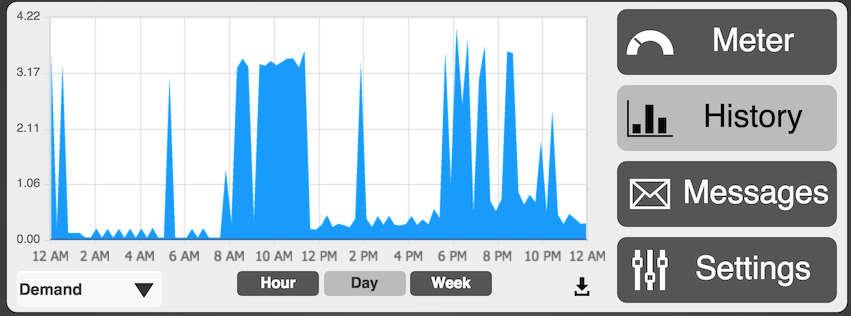
The main screen I’m usually looking at is the History screen and the Demand tab:
Eagle energy monitor demand history
The data here is straightforward. Higher line means higher power draw from the utility lines. The different time windows – hour, day, week – will summarise the data into neater representations. As a result, you might see some wild fluctuations disappear when you view a longer period of time.
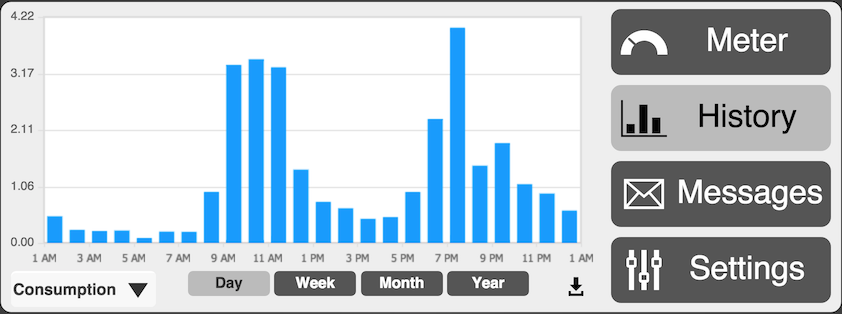
The Consumption option shows a slightly different view of the world. This chart represents more of how the electricity company will view your usage, grouped into total consumption per hour.
Eagle energy monitor historic consumption chart
In some of the cloud services you are able to switch to a cost view as well, that puts dollar values on the chart instead. More on that when we examine them in more detail.
The final item to look at here is the data download button – to the left of the Settings button. This will dump a text file that is comma delimited with two columns: timestamp in seconds and a current kiloWatt value. Open it in Excel or your favourite text editor.
As you’ll see, the timestamp frequency varies and looks to sample between 5 and 10 seconds on average. For those new to timestamps like this, it’s a very handy representation that allows time to be encoded in a single integer number. The number represents seconds since a certain date (Jan 1, 1970 midnight GMT). Convert it various ways, easiest is to use this website: epochconverter.com.
Eagle energy monitor data download as CSV file
That’s all for the basic views from the Eagle monitor web interface. Next time we’ll look at the RESTful API that lets us get at all the juicy data for our apps and further hacking.
This definitely sounds promising, anyone have experience running a similar setup?
A small company, SpinRay Energy, has announced the production of a new UL listed, grid-tied solar power system that couldn’t be easier to install. Plug-in solar power equipment may be a game changer in the arena of small residential solar power.
I see two scenarios for those in rental environments – hanging something from windows or setting up on a porch. Ultimately I guess the efficacy will be limited by size availability and cost, but size issues could be minimised if it were possible to hang PV systems in some manner without needing to screw things down into exterior walls.
Just a thought – you tried anything like this? Share any links to your favourite portable, yet substantial, systems.
Energy monitoring isn’t only about knowing what’s happening right now, but also understanding what happened historically. Often that includes knowing not just what was happening but also when and why. Enter cloud services for energy monitoring. They range from simple charts and graphs to predicting your usage over time – essentially storing, analysing and enriching your raw data.
In this post I review two cloud services that I’ve tried so far and show you what you get from them.
This is part 2 of a series of posts about the Internet of Things applied to Home Energy Monitoring.
The rainforest automation Eagle unit I have comes pre-configured with support for a few different cloud services: Wattvision, BuildingOS, Bidgely, BlueDot. (Ignore the Powereye entry for now, that’s just me mucking around).
Eagle monitor cloud service configuration options
To enable a service:
Create an account on the website for one of the services (links above)
Provide them with your Cloud ID as shown in the config screens on the Eagle
Select the cloud provider in the Eagle settings and choose Set Cloud
Wait – Give it a minute to get started. It will restart some stuff on the Eagle device
Visit the service provider website to see what’s going on
BlueDot service config screen
Bidgely energy monitoring config settings
Behind the Scenes
What exactly happens when you choose a cloud provider in the Eagle settings?
When one is chosen, the Eagle device will transmit the energy data to the provider. Along with your device identifier, with every reading it generates a data packet for the provider to read and use in its system. The system detects that it’s your data and makes it available to your account.
The bonus is that this results in you essentially having a copy of the data available elsewhere, on another server. What that server does with it after is its own business. Each provider has their own website tools and/or mobile apps that access your data and the results of their services.
So don’t expect anything on the Eagle screens to change when these are configured, it’s only sending a copy of the data and you have to go to those other sites/apps to get the added value.
As an aside, you could even set up your own server and stream your data to it! More on that in the future.
BlueDot
BlueDot was the first service I tried. It provides a very basic set of features, pretty much all being shown in this chart summary screen.
BlueDot Energy Monitor Dashboard
The charts seem to show the data in 15 minute increments.
I haven’t run it long enough to really get full value from the service. At the bottom of the screen there is a My Recommendations section. As it analyses more data it will add value in this spot. They explain on their website:
Our cloud-based servers constantly analyze your home energy usage and use this information to create personalized money-saving recommendations and special offers. These recommendations are sent to the “Just For You” page in your BlueDot web browser or smartphone application.
Sounds good to me! I hope to give it a more thorough test in the future.
If all you want is a simple chart right out of the box, this was very easy to get started with.
Bidgely
Most of the past day I’ve been running with the Bidgely service, so I’ve now got 24 hours worth of data to show.
Bidgely Energy Monitor Dashboard
The dashboard is rich with information. There are also two chart views, one showing usage (“demand”) and one showing an energy billing estimate.
During the configuration stage you tell it what utility you are getting your energy from and it will config the rate.
The most interesting part of Bidgely is the application of data analytics. To start with, they have a tool that helps you train their system and to give you an estimate of how much it costs you to use an appliance. You can use the mobile app or the website to tell it, for example, that you are going to turn on your air conditioner. The service will watch for a few seconds or a minute and identify what kind of spike that device creates.
Bidgely Appliance Detective Mode
It is actually fun to go through their list and activate all the appliances you own!
The list is not comprehensive yet but I expect it will become longer in the future. Based on comments in their community forums, users also want to be able to track other appliances or even their custom ones.
Bidgely’s main focus is not just on showing the data, but on identifying which appliances use what amounts of energy. You can see this in the dashboard screen in the centre-left. I called my system Whole House. They automagically created a sub-group called Always On – that’s the baseline usage that never seems to go away. I’ll be attacking those energy vampires in the future too!
As they collect more data, my appliances will start to show up here as well. That will be really cool. I’m not sure how long it will take, but sounds like it might take a month or two before that happens.
At the end of the day I’ll be able to see which appliances use the most power and then adjust accordingly.
Summary
So far I haven’t made any huge discoveries or conclusive decisions for how to save on energy. However, I did realise that the water heater is a secret sucker – it is so far out of sight and mind that I didn’t even think about it until I saw a strange plateau spike up at 11pm – when I had already shut down all my appliances and after I had showered before bed.
My space heaters are the largest culprits so far and next is the oven. I figured this out just by looking at the times and watching what was going on around me.
At this pace I’ll soon be able to have my own, personal, conclusive evidence of which is better for heating tea – microwave or stove top. Then everything will be right in the world!
Stay tuned for a review of more cloud services in my next post of this series. Find me on Twitter to share more ideas or leave a comment to tell me what other areas you would like to learn about on this topic.
In my next series of blog posts we explore an Internet of Things topic – Home energy monitoring – from a first person perspective. Join me as I install, use and hack a monitor (and related cloud services) in my new home.
This is part 1 of a series of posts about the Internet of Things applied to Home Energy Monitoring.
I recently moved into a new home that uses electric heat exclusively. Having come from a natural gas forced air furnace, I wasn’t sure what to expect in terms of cost. I used to just keep the thermostat at 20C and forget about it. After hearing some horror stories about $800 electricity bills for heating this place, monitoring it became a little more important to me. So, I ordered an energy monitor.
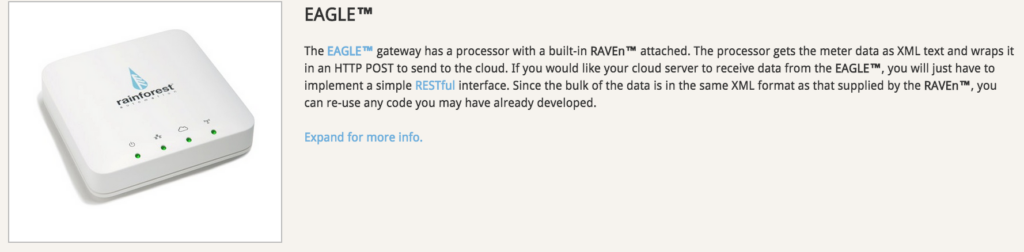
Eagle energy monitor IoT device from Rainforest Automation
In my next post I’ll talk about how I connect it to some cloud services and see what they provide. In the end, it is ultimately an open platform and boasts a REST API and developer documents that I’ll be digging into.
Smart Meter 101
They communicate wirelessly using a Zigbee compatible protocol. So the Eagle monitoring unit is capturing data from that broadcast (the current meter reading counter) and storing it on the device with a timestamp. This leads to some other questions as well, especially for the DIY device hacker.
Are there other ways of capturing that data without Zigbee – i.e. optical? I think there are but haven’t investigated it much as this option was pre-configured and not horrendously expensive (~$60) for getting an embedded system with web server, Zigbee and more (can’t wait to hack this sucker!).
Does the meter actually store any historical data? I’m hoping to find out, but I believe that all it spits out is the current meter counter, so it doesn’t matter if it misses a bunch of transmissions, it will correct itself later on.
Can I read my neighbours? Looks like you need some special ID numbers generated from a hydro service account to access the meter, so I doubt that I’ll be trying it on others.
In-Device Application
After plugging it in and hooking it to an ethernet cable to my router, all the green lights came on except the Cloud light (as I hadn’t configured it yet). The unit had a label on the underside with the name of the device as it would appear on my network eagle-xxxxxx.local – I just checked my router and used the IP directly.
First they tell you to go to their website and enter in a few codes from the label. I didn’t get too far with that until I actually powered off the device once and restarted it. Then I could hit the host/IP and start using it right away. I did send a support request to them mentioning some of these issues and they actually updated their docs, so be sure to communicate early if you are working through a similar scenario it yourself.
The Eagle unit runs a few services, e.g. the RESTful interface and a web server that you can hit directly when plugged into your local network. The main part of the UI I’m interested in is a usage History graph, showing hourly, daily or weekly usage. It also has a download feature so you can get a CSV text file showing the same data.
I’m not sure yet how much data it will retain, guess we’ll find out tomorrow.
Graph showing electricity usage from an Eagle home enery monitor
Feeding External Services
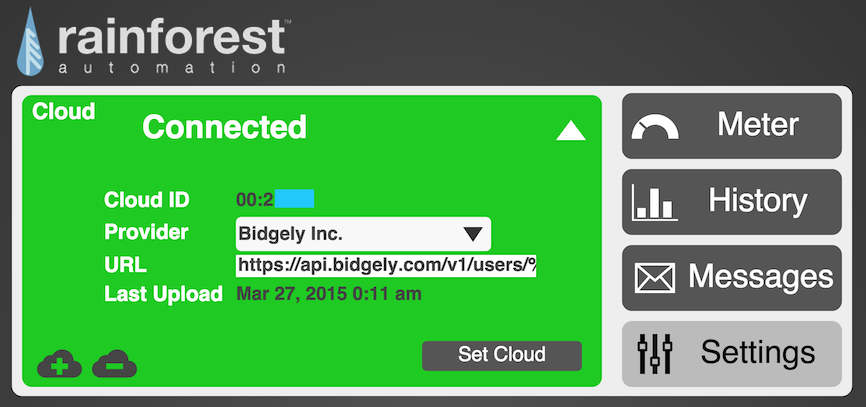
Eagle energy monitor UI for configuring cloud connected services
An important part of the Settings in the unit are for configuring cloud services. When configured, the Eagle unit can push data to an external service. There are a few pre-defined ones, BlueDot, Bidgely, etc. but also the option to add your own custom service URL. (Which tells that I think I know what Part III of this post will be already 🙂 )
The only bummer I noticed with the cloud services so far is that, at least with the one I’ve tested, it only works when a web connection is online. Although the monitor will continue to store data and you can view it in the devices history chart, it does not re-send records to an external service after a network failure.
So, if you are like me and want to even shut down your Internet at night to save energy, just don’t expect to gain all the benefits. More on that later. Until then, I’ll be leaving it all on so we can see how things go.
Next Steps
My next planned steps are to get a baseline for my energy usage during the day. It’s actually pretty easy for me to see how it’s going throughout the day as I work from home and several of us are in the house all day long. It’s pretty cool so far to see a spike go up when heaters turn on or the hot water is getting low.
First World Problems
Although I’m going to try to get my energy bill down, I’m still amazed at how cheap our power is, especially relative to those in the world who don’t have access to any. So if I look like I’m out of touch trying to save a few cents a day keep in mind, I’d pay 10x my current bill before I gave up my clean, hydro-generated, renewable power in place of a dark hut with a dung fire! I’m very thankful I can even run these experiments.